
Software integrations allow different applications to connect and share data. In ecommerce, they’re most often used to move key information like order details, customer data, shipping and tracking info, and inventory levels between platforms automatically.
Watch And Learn
Visual learner? Here’s a video explaining how integrations work on Order Desk.
How Do They Work?
Each piece of software is built with its own internal systems and terminology. Let’s look at two fulfillment companies as an example:
Donut Warrior and Bunches Of Bagels. Both offer 2-3 day expedited shipping options, but Donut Warrior calls theirs “Glazing Fast” while Bunches of Bagels calls the same shipping option “Toasted Turbo”. If a store has sold an item via their sales channel that included expedited shipping under a third name, none of the services would immediately understand which shipping option to assign to the order.
That’s where an API integration comes in handy.
What Is An API?
An API, or Application Programming Interface, is what allows one service to make parts of its data available in a structured way. APIs define what information can be shared and how other software should request it. Here’s an example of what data might look like via an API:
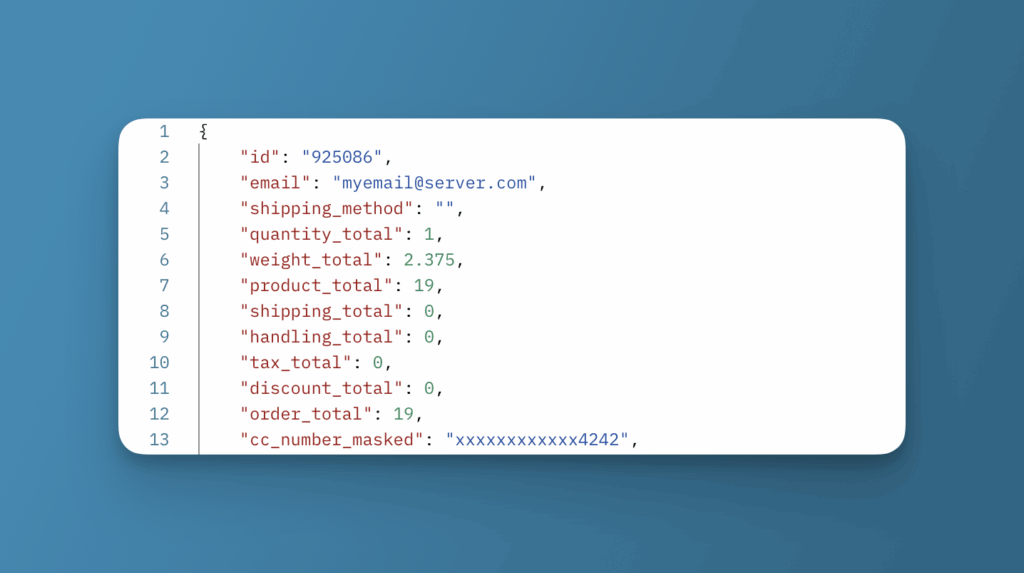
An integration will take that data and present it in a way that is easier to understand, essentially acting as a translator for the raw data. The API allows another piece of software to access to specific data in its system, and the integration is what translates it into something other systems can use.
Order Desk builds the majority of its integrations by connecting to their APIs, though some older services use a different method for sharing data: EDI, or Electronic Data Interchange. EDIs are often found in industries like manufacturing and freight, and while they aren’t commonly used with Order Desk, they serve a similar purpose: standardizing how businesses share data between systems.